


A dmarc lookup is the process of querying DNS to find and inspect the DMARC TXT Record published for a specific domain name. DMARC, defined in RFC 7489, stands for Domain-based Message Authentication, Reporting, and Conformance. It builds on SPF and DKIM to help receiving mail servers determine whether an email claiming to come from a domain is legitimate.
For organizations, a dmarc lookup is more than a technical DNS lookup. It is a core part of modern email authentication and email security. Without DMARC, attackers can more easily impersonate a trusted domain name in phishing campaigns, business email compromise attempts, and other spoofing attacks.
A proper dmarc record tells mailbox providers how to handle messages that fail authentication. This helps protect users, preserve Brand Reputation, and improve email deliverability by proving that legitimate mail streams are aligned with the domain’s published policy.
Why DMARC Matters in the Email Ecosystem
Contents
The global email ecosystem depends on trust between senders, receivers, DNS infrastructure, and the Mail Transfer Agent systems that route messages. DMARC gives domain owners visibility and control over who is sending email on their behalf.
A dmarc check helps answer key questions:
- Does the domain name have a valid dmarc record?
- Is the dmarc policy set to monitor, quarantine, or reject?
- Are SPF and DKIM passing and aligned?
- Are authorized senders properly configured?
- Is the domain ready for dmarc enforcement?
A regular dmarc check is essential for maintaining dmarc compliance, especially for an Enterprise, an MSP, or any organization handling customer communications at scale.
How DMARC Records Work: SPF, DKIM, Alignment, and Policy Tags
A dmarc record is published in DNS as a TXT Record at:
_dmarc.example.com
The record defines how receiving servers should evaluate authentication and what actions they should take when messages fail DMARC. A simple dmarc record might look like this:
v=DMARC1; p=none; rua=mailto:*dmarc*-reports@example.com; pct=100
SPF, DKIM, and Authentication Results
DMARC relies on two key Authentication Protocols: SPF and DKIM.
SPF, or Sender Policy Framework, verifies whether a sending server is authorized to send email for a domain. An spf check confirms that the sending IP appears in the domain’s SPF policy. Some teams also use SPF Flattening to reduce DNS lookup complexity.
DKIM uses Digital Signatures to verify that a message was not altered in transit. A dkim check validates the cryptographic signature in the Email Headers. DKIM Tools can help inspect selectors, keys, and signature validity.
For DMARC to pass, either SPF or DKIM must pass and align with the visible From domain. These authentication results are what receiving mail systems use to determine DMARC conformance.
SPF Alignment
SPF alignment means the envelope sender domain aligns with the visible From domain name. In some documentation, this may be referenced informally as sp authentication, though the standard term is SPF authentication.
DKIM Alignment
dkim signature alignment means the DKIM signing domain matches or aligns with the From domain. This is critical because an email can technically pass DKIM but still fail DMARC if the signature belongs to a different domain.
DMARC Policy Tags Explained
A dmarc policy is controlled by tags inside the DNS TXT Record. The most important tags include:
- v tag: Identifies the record as DMARC, usually v=DMARC1
- p tag: Defines the main dmarc policy
- rua tag: Specifies where aggregate reports should be sent
- ruf tag: Specifies where forensic reports may be sent
- sp tag: Defines subdomain policy
- aspf tag: Controls SPF alignment mode
- adkim tag: Controls DKIM alignment mode
- fo tag: Defines failure reporting options
- rf tag: Defines report format
- pct tag: The percentage tag that controls policy rollout
- ri tag: Sets the reporting interval
Common policy modes include:
- p=none for monitoring
- p=*quarantine* for a quarantine policy
- p=reject for a reject policy
A mature dmarc policy gradually moves from monitoring to dmarc enforcement. This controlled approach prevents legitimate messages from being blocked while improving protection against phishing.
Policy Distribution and Rollout
Good policy distribution means applying DMARC consistently across primary domains, subdomains, marketing platforms, transactional systems, and third-party senders. The percentage tag can help phase in dmarc enforcement by applying the policy to only a portion of failing messages at first.

Using a DMARC Lookup and Validation Tool to Check DNS Records
A dmarc lookup online tool automates the process of retrieving and analyzing DMARC DNS records. Instead of manually querying DNS, administrators can enter a domain name into a dmarc record checker and quickly see whether the record is valid, complete, and aligned with best practices.
Tools such as EasyDMARC, MXToolbox, SuperTool, Domain Scanner, and Delivery Center provide different levels of dmarc validation, diagnostic checks, and visibility into domain configuration. Some platforms also offer broader Email Health analysis, BIMI readiness checks, and Managed BIMI support.
What a DMARC Record Checker Reviews
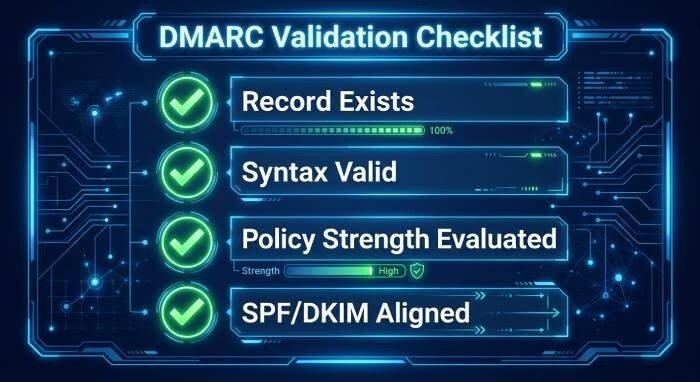
A good dmarc record checker evaluates:
- Whether a dmarc record exists
- Whether the TXT Record syntax is valid
- Whether there is more than one DMARC record
- Whether the dmarc policy is too weak
- Whether rua tag and ruf tag destinations are configured correctly
- Whether SPF and DKIM are aligned
- Whether the domain is ready for dmarc enforcement
A dmarc diagnostic tool may also run an spf check, a dkim check, and a broader dns lookup to identify related issues in DNS records.
From Lookup to Reporting
The real value of DMARC appears after reports start flowing. A dmarc report gives domain owners visibility into legitimate senders, unauthorized sources, failed alignment, and suspicious behavior.
There are two main types of reporting:
- Aggregate Reports: XML-based summaries showing sending sources and pass/fail results
- Forensic Reports: Detailed failure reports, when supported, that may include message-level information
A single dmarc report can reveal forgotten SaaS platforms, misaligned DKIM selectors, or unauthorized servers attempting to use the brand. Over time, each dmarc report helps security teams refine authentication and move toward stronger dmarc compliance.
Common DMARC Record Errors and How to Fix Them
Even a small misconfiguration can cause a DMARC deployment to fail or produce unreliable results. A dmarc check should be performed whenever DNS records change, new email vendors are added, or authentication failures appear in reports.
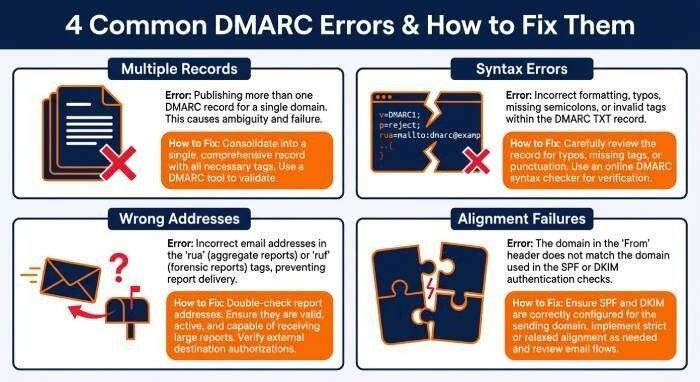
Multiple or Missing Records
A domain must have only one valid dmarc record. Multiple records can cause an invalid record result, making the policy unusable. If a dmarc lookup finds no record, receivers have no published instruction for handling unauthenticated mail.
Fix: Publish a single TXT Record at _dmarc.yourdomain.com and validate it with a dmarc record checker.
Syntax and Tag Errors
Common errors include missing semicolons, incorrect tag names, unsupported values, or malformed reporting addresses. For example, a typo in the p tag or rua tag can prevent proper processing.
Fix: Use a dmarc record checker to validate syntax before publishing. Then run a fresh dmarc check to confirm DNS propagation.
Incorrect Reporting Addresses
If aggregate or forensic destinations are wrong, the organization loses visibility. That weakens dmarc compliance because administrators cannot verify conformance or monitor abuse.
Fix: Confirm that the reporting mailbox exists and can receive high-volume XML data. Also verify third-party report authorization when reports are sent to an external analytics provider.
SPF and DKIM Alignment Failures
A message can pass SPF but fail DMARC if the envelope sender does not align with the From domain name. Likewise, a message can pass DKIM but fail if the signature uses a vendor-owned domain instead of the organization’s domain.
Fix: Configure vendors to send as aligned domains, enable custom DKIM signing, and ensure all authorized senders are included in SPF or DKIM workflows.