


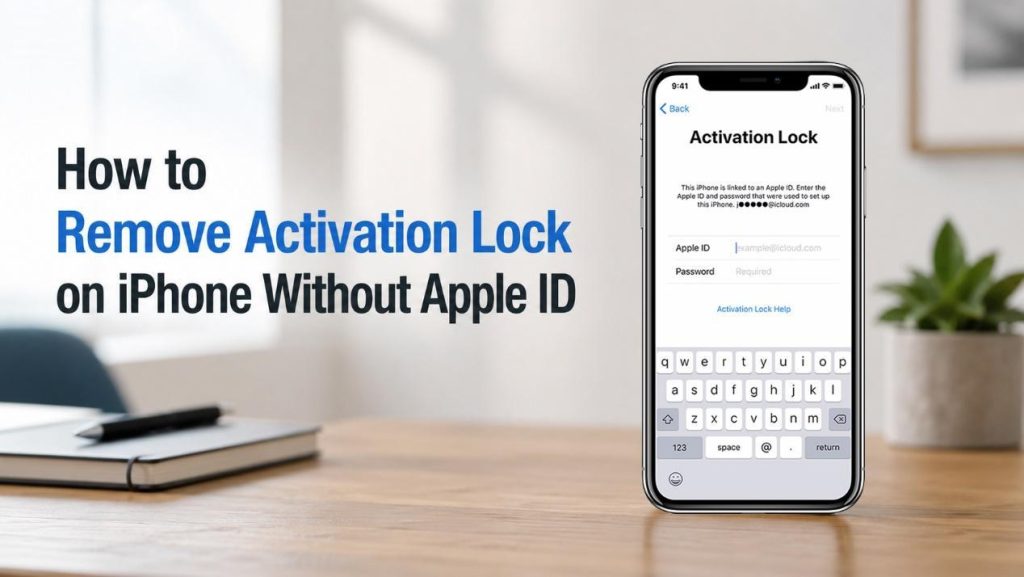
Are you facing the problem “iPhone Locked to Owner” after setting up your iPhone or iPad? This message usually means that Apple’s Activation Lock feature is enabled on the device, and you need the original Apple ID and password to activate it. The problem often occurs when you buy a second-hand iPhone, forget your Apple ID credentials, or receive an iPhone from a family member.
So, is it possible to remove Activation Lock on iPhone without an Apple ID or passcode? The answer depends on your situation. In this guide, we’ll explain why Activation Lock happens and show several ways to bypass iCloud Activation Lock on an iPhone.
Why Does “iPhone Locked to Owner” Happen?
Contents
- Why Does “iPhone Locked to Owner” Happen?
- How to Remove Activation Lock on iPhone Without Apple ID
- Method 1: Ask the Previous Owner to Remove Activation Lock Remotely
- Method 2: Use a Professional Activation Lock Removal Tool
- Method 3: Bypass iCloud Activation Lock Using “Unlock with Passcode” Option
- Method 4: Remove Activation Lock via Apple Support
- Method 5: Using DNS to Bypass Activation Lock (Temporary Solution)
- How to Bypass iCloud Activation Lock If You Forgot Apple ID Password
- Conclusion
Activation Lock is a security feature automatically enabled when Find My iPhone is turned on. It is designed to prevent unauthorized users from activating or using an iPhone if it is lost or stolen.
You may encounter the Activation Lock screen in these situations:
- You purchased a used iPhone that is still linked to the previous owner’s Apple ID.
- You forgot iPhone passcode or Apple ID password and cannot sign in.
- The previous owner forgot to remove the device from their account before selling it.
- You erased your iPhone and now cannot remember the associated Apple account.
When Activation Lock is enabled, simply factory resetting iPhone will not remove it. But don’t worry, there are still some ways to solve this problem.
How to Remove Activation Lock on iPhone Without Apple ID
Method 1: Ask the Previous Owner to Remove Activation Lock Remotely
If you bought a second-hand iPhone and can still contact the original owner, this is the easiest and most reliable solution. This method permanently removes Activation Lock and works on all iPhone models and iOS versions.
Ask the previous owner to:
- Sign in to iCloud using their Apple ID.
- Go to Find My and select All Devices.
- Choose the locked iPhone.
- Click Erase This Device if necessary. Select Remove from Account.
Once the device is removed from the previous owner’s Apple ID, restart the iPhone and begin the setup process again. The Activation Lock screen should disappear.
Method 2: Use a Professional Activation Lock Removal Tool
If you no longer have access to the previous owner, using a professional Activation Lock removal tool may be another option. TunesKit iPhone Unlocker is a reliable tool offering an Activation Lock removal feature for supported devices. It can help bypass the iCloud Activation Lock screen on certain iPhone models without requiring the original Apple ID password.
General steps:
- Download and install TunesKit iPhone Unlocker on your computer. Connect your iPhone using a USB cable.
- Launch the software and select the Remove iCloud Activation Lock feature.

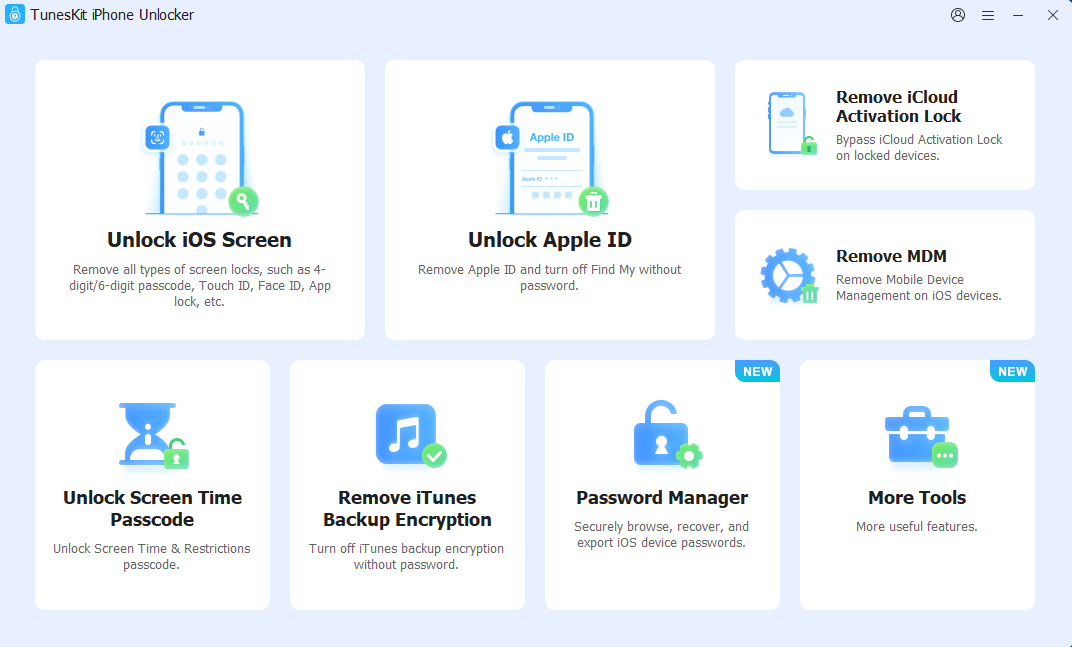
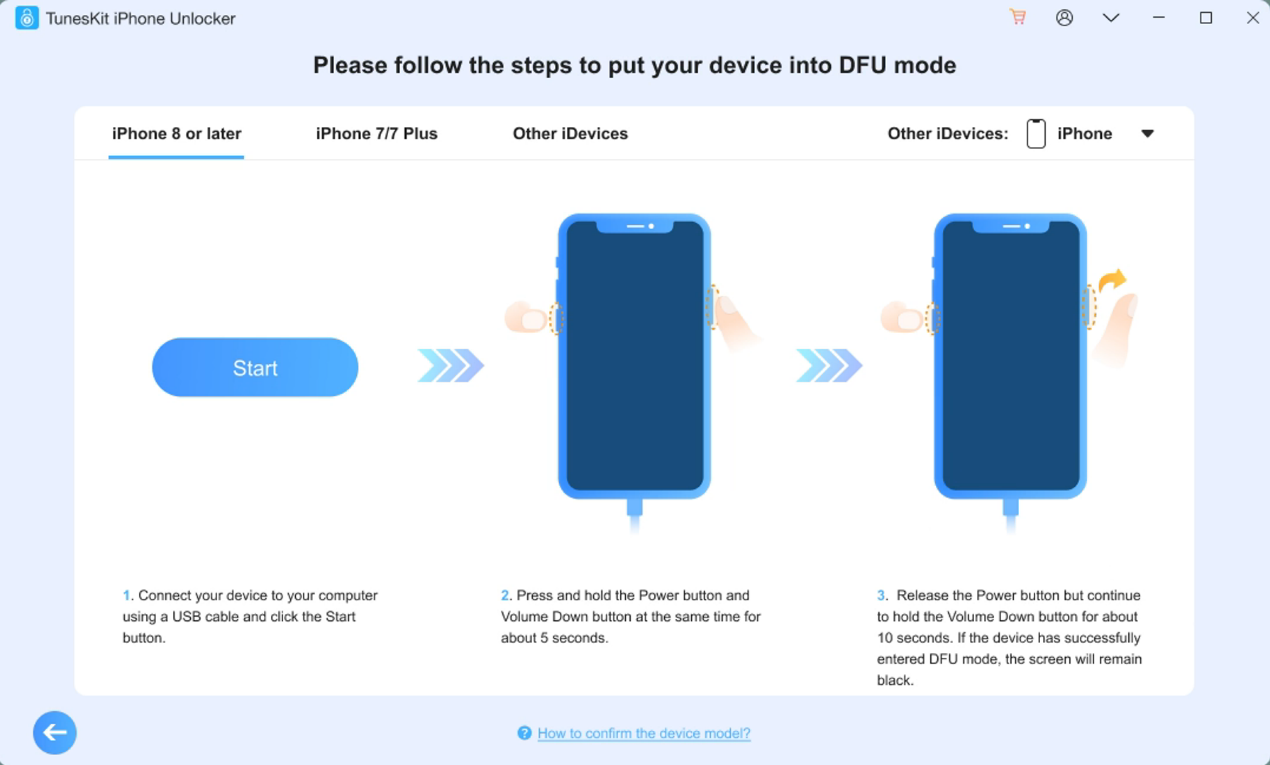
- Follow the on-screen instructions to put your iPhone into DFU mode.

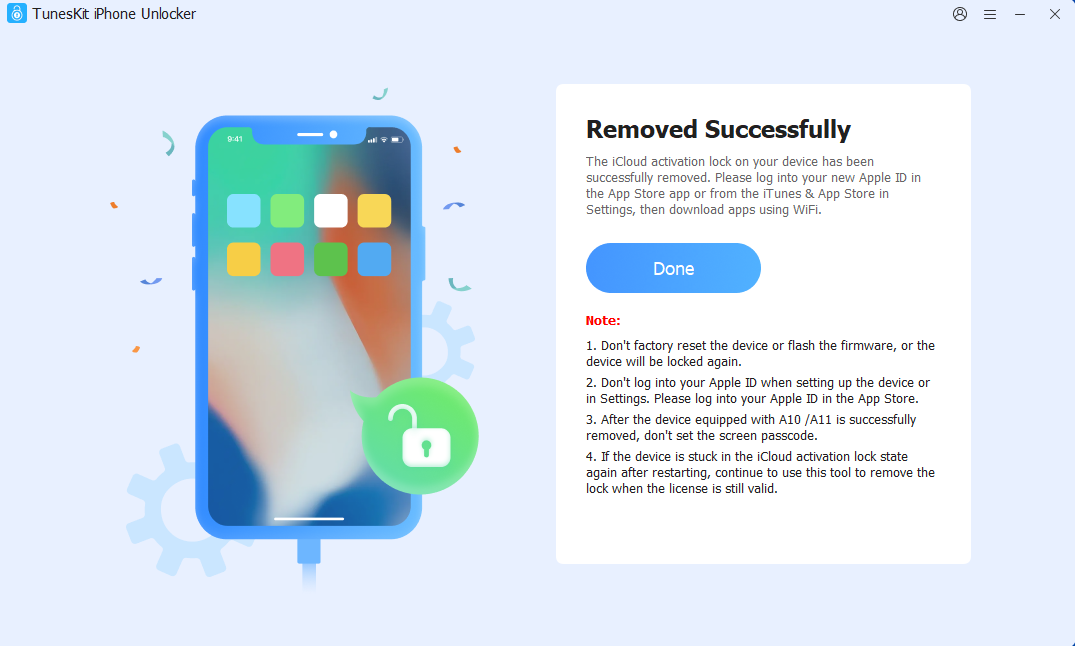
- Activation Lock removal process will automatically start, waiting for it to finish. After the process is complete, you are able to access the device and set it up.

Besides removing Activation Lock, TunesKit iPhone Unlocker can also help unlock screen passcode, bypass Screen Time restrictions, remove Apple ID, and unlock iPhone with broken screen when the display is unresponsive. This makes it useful for various iPhone lock-related issues. Before using any third-party tool, make sure to check its supported devices and limitations.
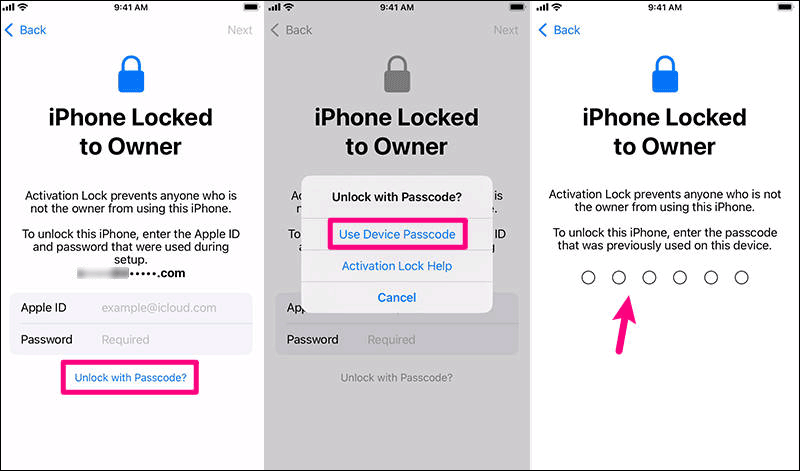
Method 3: Bypass iCloud Activation Lock Using “Unlock with Passcode” Option
In some situations, users can bypass Activation Lock by using the Unlock with Passcode option. However, this method only works in certain circumstances and is not available on every device.
To try this method:
- On the Activation Lock screen, tap Unlock with Passcode.
- Select Use Device Passcode.
- Enter the screen passcode previously used on the iPhone.
If successful, the device will continue the activation process without requiring the Apple ID password.

Method 4: Remove Activation Lock via Apple Support
If you are the legitimate owner of the device, Apple may be able to remove Activation Lock for you. This method is secure and official, but it only works for legitimate owners who can prove ownership.
You will usually need to provide:
- Original proof of purchase
- Receipt showing the serial number or IMEI
- Personal identification information
To request assistance:
- Gather your purchase documents.
- Contact Apple Support.
- Explain that you are unable to access the Apple ID associated with the device.
- Submit the required information and wait for a reply.
If Apple verifies ownership, they may remove Activation Lock from the device.
Method 5: Using DNS to Bypass Activation Lock (Temporary Solution)
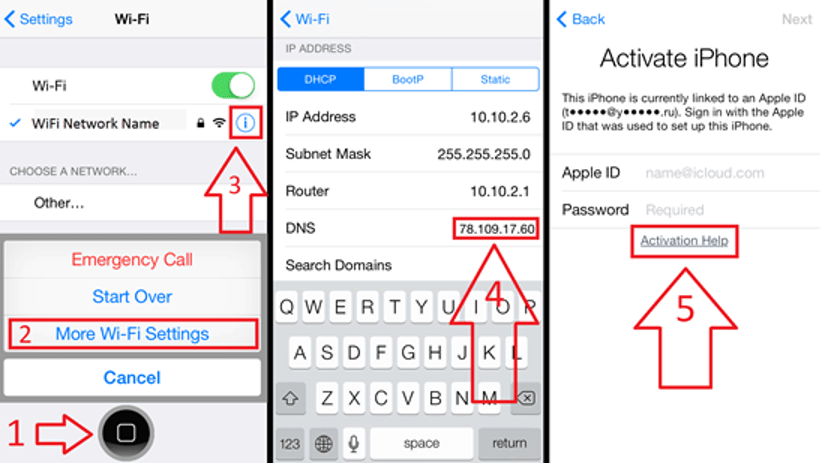
Another method often mentioned online is the DNS bypass technique. Instead of completely removing Activation Lock, DNS bypass temporarily redirects the activation process to a custom server, allowing limited access to certain features.
Steps:
- Reset the iPhone and reach the Wi-Fi setup screen.
- Tap the information icon next to your Wi-Fi network.
- Choose Configure DNS and select Manual.
- Enter a custom DNS server address:
- Go back and reconnect to Wi-Fi.
If successful, you may gain access to certain apps or services. However, DNS bypass is only a temporary workaround because it cannot permanently remove Activation Lock, leaves most iPhone features inaccessible, and may become ineffective after a restart.

How to Bypass iCloud Activation Lock If You Forgot Apple ID Password
If the locked iPhone belongs to you and you simply forgot your Apple ID password, resetting your password is usually the easiest way to regain access and remove Activation Lock.
Follow these steps:
- Go to Apple’s password reset page at iforgot.apple.com.
- Enter your Apple ID email address and follow the on-screen instructions.
- Verify your identity using a trusted phone number, trusted device, or other available recovery options.
- Create a new Apple ID password and confirm the change.
- Return to your iPhone setup screen and sign in with your Apple ID and new password.
After you sign in successfully, Activation Lock will be removed automatically, allowing you to continue setting up your iPhone.
FAQs
1. Do Free Activation Lock Removal Websites Really Work?
Most websites claiming to remove iCloud Activation Lock for free are unreliable. Many simply ask for payment after checking your IMEI, while others may collect personal information. There is currently no universally free online service that can permanently remove Activation Lock from all iPhones.
2. Is It Safe to Use Activation Lock Removal Tools?
It depends on the software you use. Reputable tools can be relatively safe when downloaded from official websites. However, avoid unknown programs that promise instant removal on every iPhone model, as some may contain malware or make misleading claims.
3. Does Factory Resetting an iPhone Remove Activation Lock?
No. Factory resetting an iPhone does not remove Activation Lock. If Find My iPhone is enabled, the device will still require the original Apple ID and password during activation.
Conclusion
Activation Lock is designed to protect iPhones from unauthorized access, but it can also create difficulties if you buy a used device or forget your Apple ID credentials.
If possible, ask the previous owner to remove the device remotely. Legitimate owners can also contact Apple Support with proof of purchase. Professional Activation Lock removal tools like TunesKit can help in most situations, while users who forgot their Apple ID password should attempt account recovery first.
Choose the method that best fits your situation, and always verify that a second-hand iPhone has been removed from the previous owner’s Apple ID before purchasing it.