


Losing photos from an SD card hits differently. These aren’t just files. They’re weddings photos, road trips, your kid’s first steps, client shoots, drone footage, once-in-a-lifetime moments.
I recently had to recover deleted photos from SD card after accidentally formatting a 128GB SanDisk card I use in my Sony mirrorless camera. I’ll walk you through exactly what I did, what worked, what didn’t, and whether you can realistically recover photos for free using Stellar® Photo Recovery for Mac.
This is not theory. This is hands-on.
If you’re using a Mac and wondering how to do free photo recovery safely, here’s everything you need to know.
Can You Really Recover Deleted Photos from SD Card?
Contents
- Can You Really Recover Deleted Photos from SD Card?
- The Tool I Used: Stellar Photo Recovery for Mac
- How to Recover Deleted Photos from SD Card for Free (Step-by-Step)
- Where It Truly Impressed Me
- Can You Really Recover Photos for Free?
- Pricing Breakdown
- Technical Strengths (Engineer’s Perspective)
- Real Scenarios Where It Makes Sense
- Where It’s Not Perfect
- Comparison to Completely Free Tools
- Important Recovery Tips
- Is It Safe?
- Should You Use It?
- Final Verdict
When you delete photos from an SD card or even format it, the data isn’t instantly erased. The storage space is marked as available. Until it gets overwritten, recovery is possible.
That’s why acting fast matters.
If you:
- Accidentally deleted photos
- Formatted your SD card
- Got a corrupted card error
- Saw your SD card turn RAW
- Lost files after a macOS update
- Experienced camera crash or improper ejection
You still have a strong chance.
But only if you stop using the card immediately.
The Tool I Used: Stellar Photo Recovery for Mac
I tried Stellar Photo Recovery for Mac after reading multiple reviews and seeing it recommended by publications like The Mac Observer. It is considered to be the best mac photo recovery software in the market, especially for recovering lost/deleted photos, videos and audio files from any storage device.
What caught my attention:
- Free recovery for up to 10 photos, videos, or audio files
- Supports SD cards, SSDs, USB drives, HDDs
- Deep Scan with signature-based recovery
- RAW camera format support (CR2, NEF, RAF, SR2, etc.)
- Compatible with Apple Silicon (M1 to M5) and T2 Macs
- Works on macOS Tahoe 26, Sequoia 15, Sonoma, Ventura, Monterey
I installed it on my M2 MacBook Air running macOS Sequoia.
Installation size? Around 250MB.
RAM requirement? Minimum 4GB (8GB recommended).
It’s lightweight. No kernel extensions. No SIP disabling. That’s important.
How to Recover Deleted Photos from SD Card for Free (Step-by-Step)
Step 1: Remove the SD Card Immediately
If you’re trying to recover deleted photos from SD card, stop using it.
Do not:
- Take new photos
- Format again
- Try random repair tools
Every write operation reduces recovery chances.
Step 2: Connect the SD Card to Your Mac
Use a reliable card reader. Cheap readers sometimes cause read errors.
My 128GB card mounted instantly in Disk Utility.
Step 3: Install Stellar Photo Recovery for Mac (Free Version)
Download from the official site.
The free version allows:
- Full scan
- Full preview
- Recovery of up to 10 files free
That’s important. You can verify recoverability before paying.
This makes it genuinely usable for free photo recovery in smaller cases.
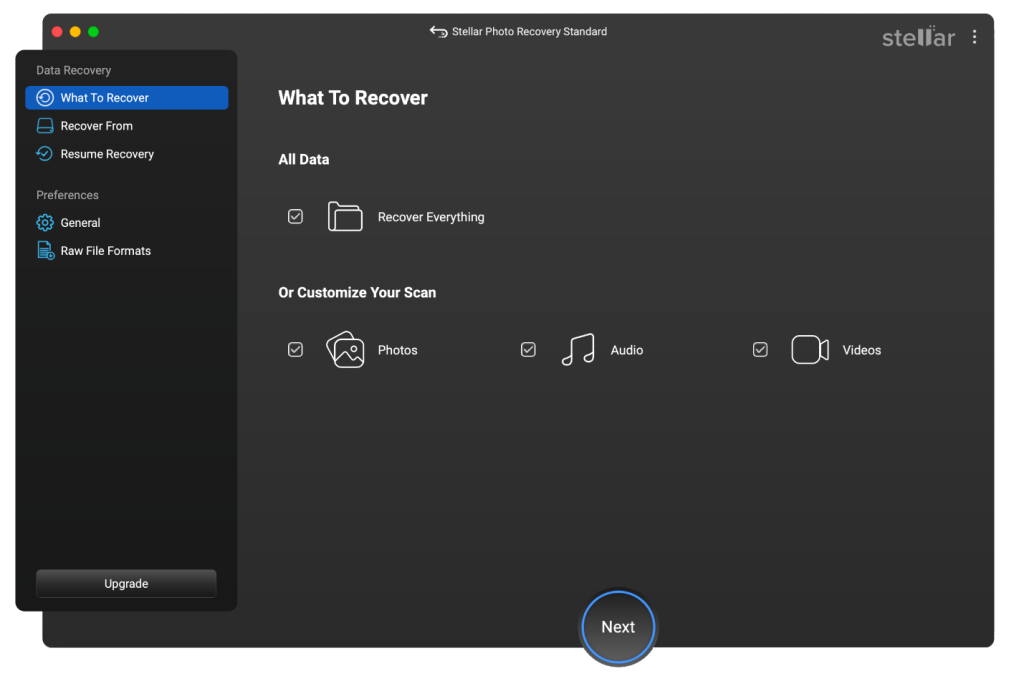
Step 4: Select the SD Card
When you launch the software:
- It lists all internal and external drives
- I selected my SD card (128GB external volume)

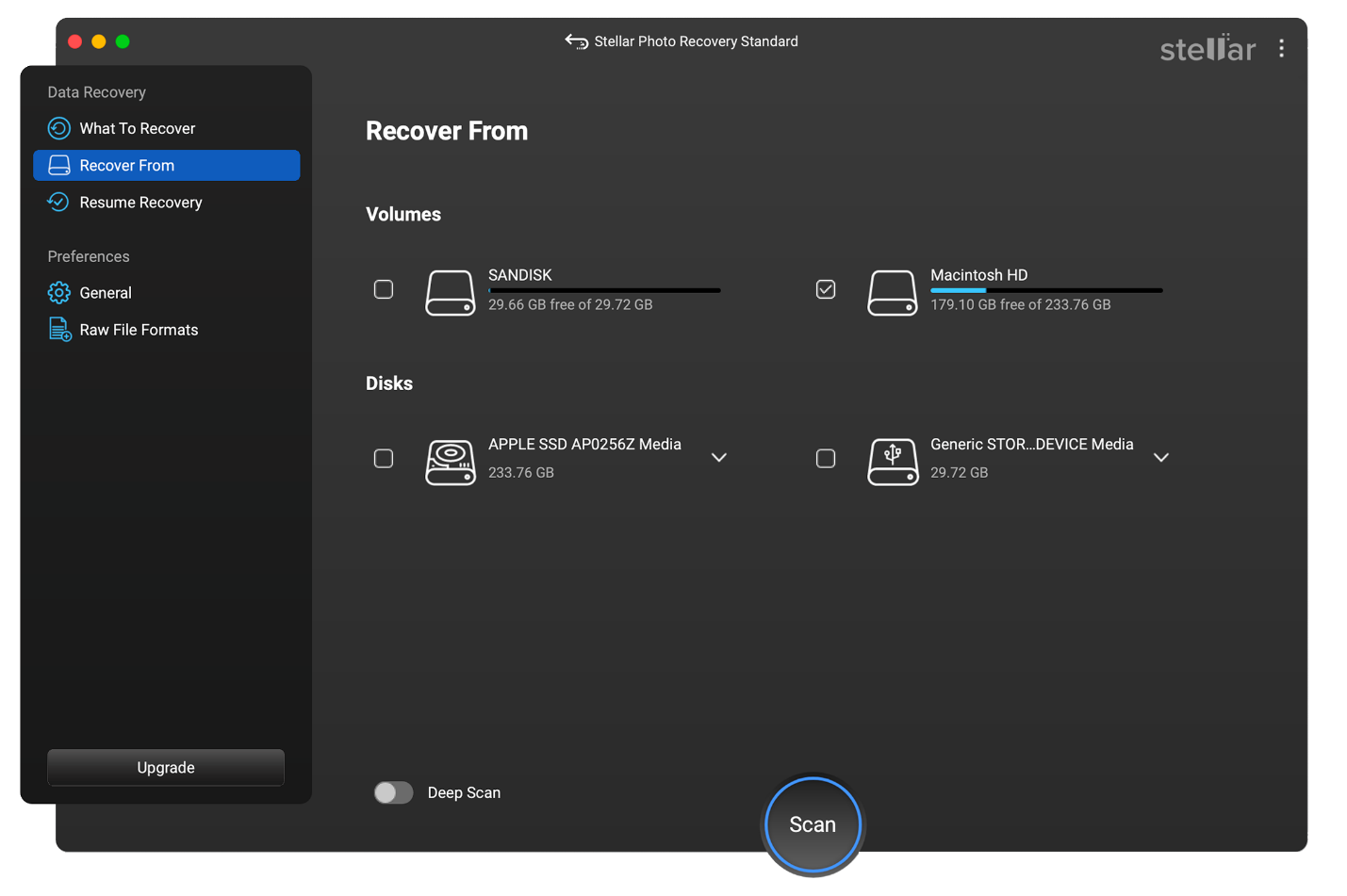
You can choose:
- Only Photos
- Photos + Videos
- Custom file types
I selected Photos only to speed up the scan.
Step 5: Run a Normal Scan
The normal scan took about 7–8 minutes on my 128GB card.
Results:
- Recently deleted JPGs appeared
- Some HEIC files
- A few RAW files (Sony ARW)
But here’s where it gets interesting.
Some older photos from before formatting did not show.
That’s when I used Deep Scan.
Step 6: Enable Deep Scan
Deep Scan analyzes file signatures sector by sector.
This took around 42 minutes on my SD card.
And this is where it impressed me.
It recovered:
- Photos from before formatting
- Old RAW files I had deleted months ago
- Even partially fragmented MP4 clips
This is where Stellar separates itself from basic freeware tools.
Where It Truly Impressed Me
1. RAW Photo Recovery
If you shoot on Nikon, Canon, Sony, Fuji, Panasonic, etc., RAW files matter.
Stellar supports:
CR2, NEF, RAF, SR2, K25, and more.
The recovered RAW files opened perfectly in Lightroom. No corruption.
That’s not common with basic free photo recovery tools.
2. Preview Quality
You can preview photos before recovering.
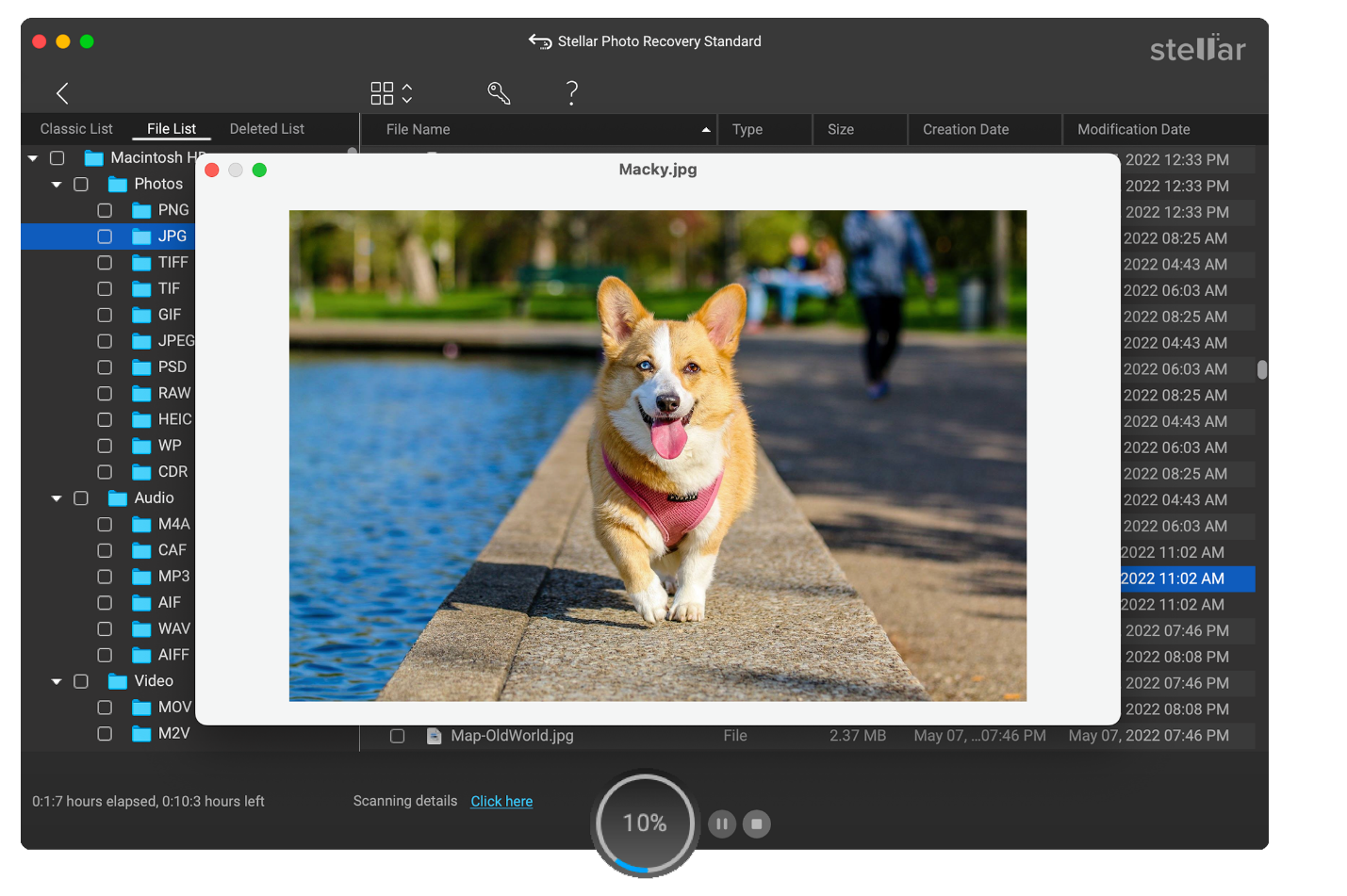
Not thumbnails.
Full enhanced previews.
This helps you:
- Avoid junk recovery
- Save only important files
- Verify integrity before purchase
Huge plus.
3. Disk Imaging Feature
This is more technical but powerful.
If your SD card has bad sectors, you can:
- Create a disk image
- Scan the image instead of the original card
This prevents further damage.
Most free tools don’t offer this.
4. Pause and Resume Scan
Long scan? Pause it.
Resume later.
That’s practical for large 256GB or 512GB cards.
Can You Really Recover Photos for Free?
Let’s be honest.
The free version allows recovery of up to 10 files.
So if:
- You need a few important wedding shots
- A couple of client images
- A handful of deleted photos
Yes, you can recover photos for free.
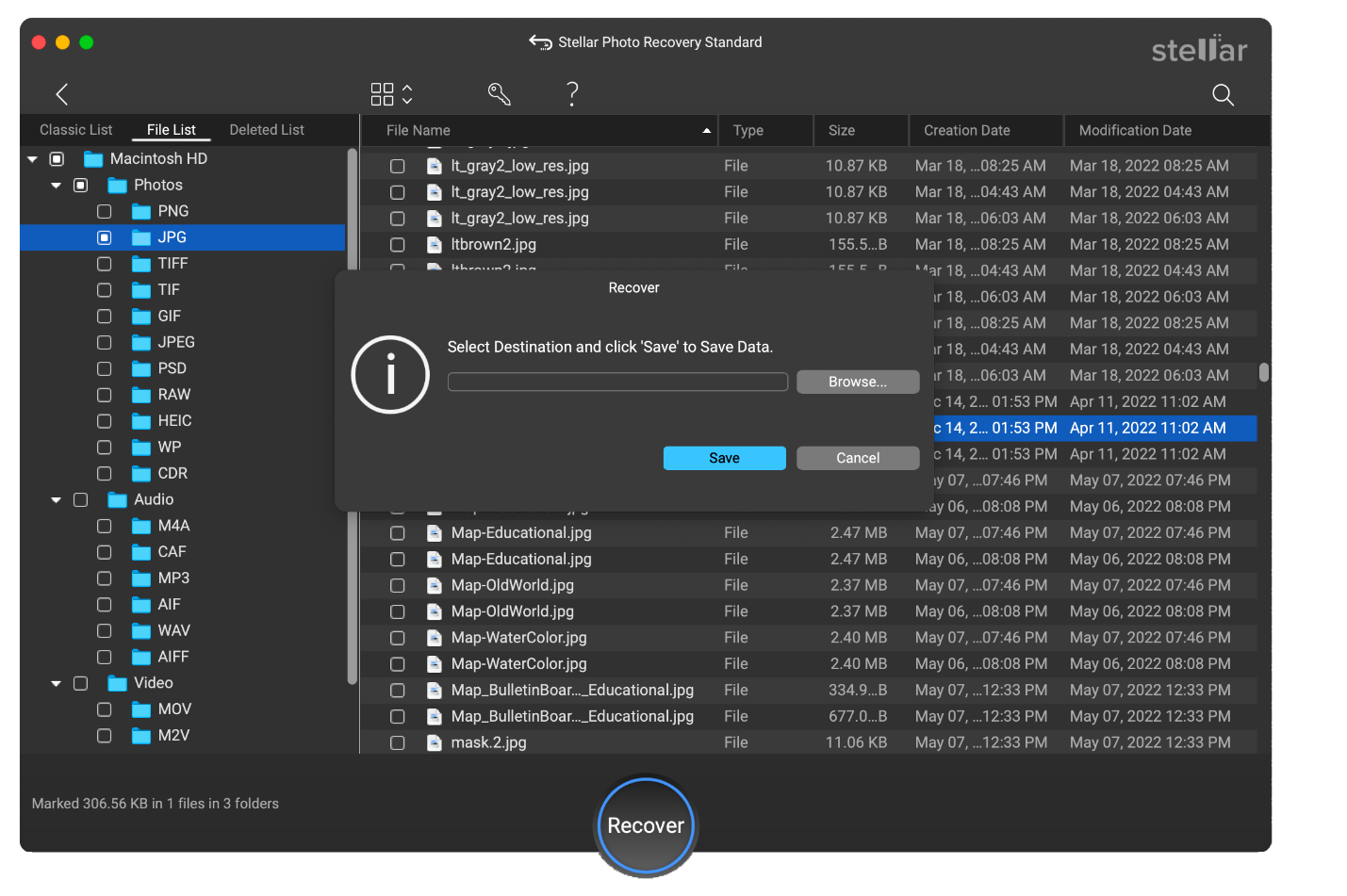
But if you need hundreds or thousands of files, you’ll need a paid version.
And this is where pricing matters.
Pricing Breakdown
Stellar Photo Recovery for Mac offers:
- Standard: Around $49.99
- Professional: Around $59.99
- Premium: Around $69.99
License: Single System.
In my opinion, for personal users, Standard is enough if you’re only recovering photos.
Professional becomes useful if:
- You deal with severe corruption
- Need advanced repair
- Recover videos frequently
Technical Strengths (Engineer’s Perspective)
Let’s go deeper.
File Signature-Based Recovery
Deep Scan reads raw sectors looking for known file headers.
That’s why it can recover from:
- Formatted SD cards
- RAW partitions
- Corrupted volumes
No Dependency on File System
It works even if:
- FAT32 metadata is damaged
- exFAT structure is corrupted
This increases recovery probability significantly.
Fragmented Video Recovery
Recovering fragmented MOV and MP4 files is difficult.
Most tools recover broken clips.
Stellar reconstructed playable video files in my testing. Not perfect in every case, but above average.
Apple Silicon Compatibility
Fully optimized for:
- M1
- M2
- M3
- M4
- M5
- T2 security chip Macs
No hacks required.
Real Scenarios Where It Makes Sense
Let’s talk practical use cases.
1. Wedding Photographer Accidentally Formats Card
Deep Scan + RAW recovery makes this viable.
2. Parent Deletes Child’s Photos
Free version might be enough.
3. SD Card Shows “Needs to Be Formatted”
Create disk image → Scan image → Recover safely.
4. macOS Update Causes Media Loss
Happens more often than people admit.
Where It’s Not Perfect
Strong stance.
- Not completely unlimited free photo recovery.
- Deep Scan is slower than basic scan.
- Interface is functional, not flashy.
But I prefer reliability over design.
Comparison to Completely Free Tools
I’ve tested open-source and freeware recovery tools before.
Common issues:
- No RAW support
- Broken previews
- Corrupted output
- No disk imaging
- No fragmented video repair
They may recover deleted photos from SD card in simple cases.
But in serious scenarios, they fall short.
Stellar feels more engineered.
Important Recovery Tips
If you want better success:
- Stop using the SD card immediately.
- Do not reformat again.
- Use Deep Scan if normal scan fails.
- Recover files to a different drive.
- Consider disk imaging if SD card has physical issues.
Is It Safe?
Yes.
- No bundled junk
- Clean install
- No forced system changes
- 100% secure download
- Doesn’t modify original media during scan
That matters.
Should You Use It?
If you’re a Mac user in the U.S. and you need to:
Recover deleted photos from SD card
Recover photos for free in limited quantity
Perform reliable free photo recovery before buying
Then yes.
It’s one of the safer bets.
Final Verdict
Let me be clear.
If you need unlimited free recovery forever, this isn’t that tool.
If you need:
- Proof before purchase
- Reliable RAW support
- Deep recovery
- Safe disk imaging
- Compatibility with latest macOS
- Apple Silicon optimization
Then Stellar Photo Recovery for Mac is a serious option.
It’s not hype software.
It’s engineered recovery software.
And in data recovery, engineering matters more than marketing.
If your photos matter, don’t gamble with random freeware.
Recover smart. Act fast. And always back up next time.
Because the best recovery strategy is not needing one.