


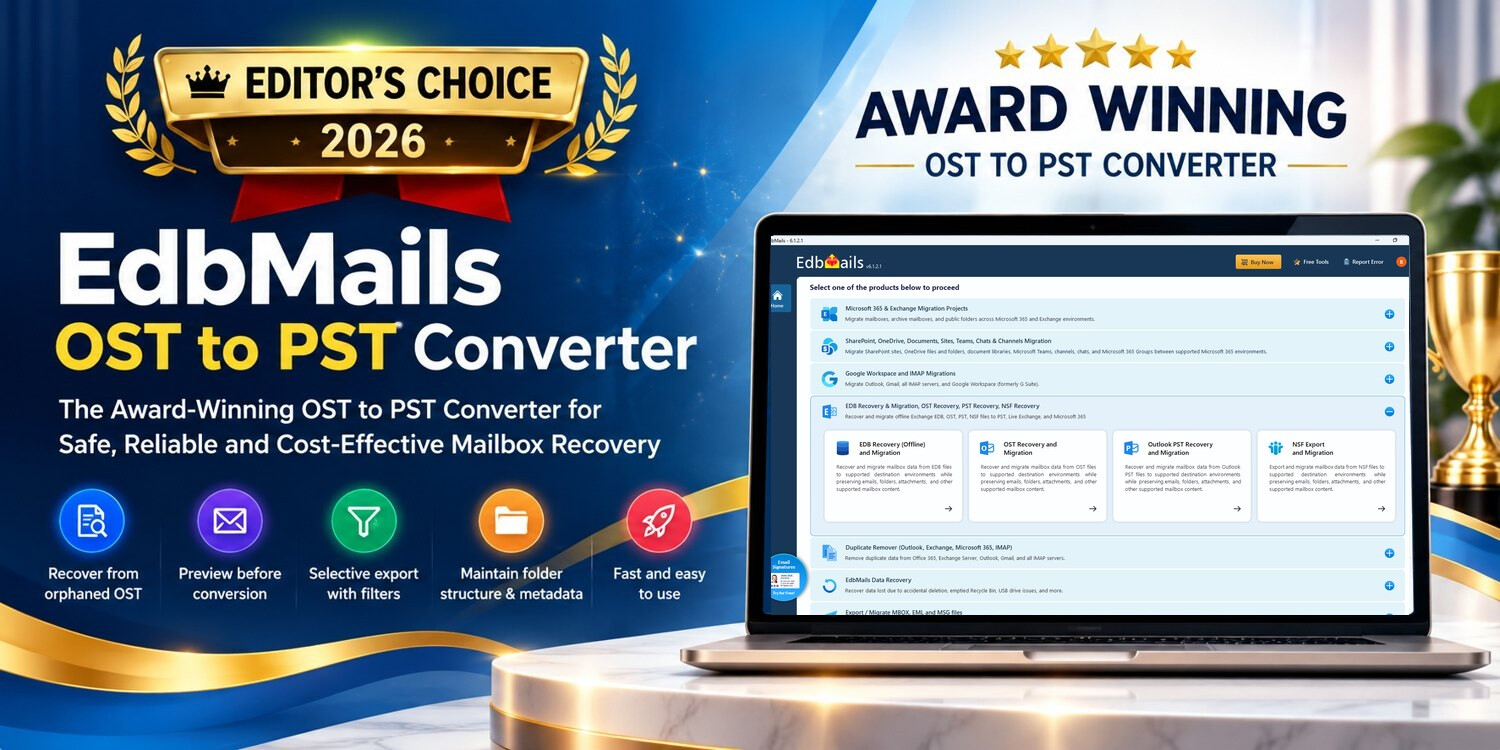
When an Outlook OST becomes orphaned, disconnected, inaccessible or damaged, the real question is not how many features a converter advertises. It is whether the software can read the mailbox information that still exists in the file, show the user what is recoverable, and export the required data into a usable PST. After reviewing the product’s workflow, recovery controls, trial model and positioning against established alternatives, we selected EdbMails OST to PST Converter for our Editor’s Choice 2026 recognition.
Why EdbMails earned our Editor’s Choice recognition
Contents
- What is EdbMails OST to PST Converter?
- Review summary
- Our editorial assessment at a glance
- Where EdbMails fits in a real recovery situation
- Key capabilities that make EdbMails stand out
- EdbMails OST to PST Converter Workflow
- How the OST-to-PST workflow works
- Recovery scenarios covered by EdbMails
- Free trial: a meaningful way to evaluate recovery
- Performance and large OST files
- Selective OST to PST conversion, recovery filters and mailbox control
- Mailbox fidelity and post-export validation
- Security and responsible recovery expectations
- What makes an OST recovery review credible?
- EdbMails compared with established OST-to-PST products
- Why we consider EdbMails a cost-effective OST to PST Converter
- Mailbox data that can be converted or recovered to PST
- Pros and considerations
- What we liked
- · Clear OST to PST conversion workflow for healthy, orphaned, disconnected, inaccessible, and damaged OST files.
- · Recovery depends on what remains present and readable in the OST file.
- · Preview mailbox data before committing to a full conversion.
- · Outlook with a configured profile is required when exporting recovered data to PST.
- · Selective folder and item-level export.
- · Server-only information or data never synchronized into the OST cannot be recreated from the local file.
- · Free trial export of up to 30 items per folder.
- · Large or severely damaged OST files should be tested with the free trial before purchasing a license.
- · Supports PST, EML, HTML, and MHT output formats.
- · Recovery results may vary depending on the condition of the OST file.
- · Detailed export reporting.
- —
- · Cost-effective starting price of $45 at the time reviewed.
- —
- · Free 24/7 technical support.
- —
- What to check before purchasing an OST to PST Converter
- Who should consider EdbMails?
- Editor’s Choice 2026: final assessment
EdbMails combines OST scanning, mailbox preview, granular folder and item selection, PST export, additional output formats, reporting and recovery-focused controls in one workflow. Its free trial allows users to evaluate their own OST before purchasing, while its Personal Edition is positioned as a cost-effective option for users whose main requirement is OST-to-PST recovery.
What is EdbMails OST to PST Converter?
EdbMails OST to PST Converter is recovery and conversion software designed to scan Outlook OST files and export supported mailbox data to PST. It is intended for healthy as well as offline, orphaned, disconnected, inaccessible, corrupt or damaged OST files. The software can inspect an OST, and it can preview detected mailbox information before the user commits to a full export.
That distinction matters. An OST is primarily a synchronized local mailbox cache. If the original mailbox is still available and healthy, reconnecting Outlook or using Outlook’s native export route may be the simplest approach. EdbMails becomes more relevant when the original profile or mailbox is unavailable, Outlook cannot use the OST normally, or locally cached mailbox data needs to be recovered independently.
❝ Review focus: This article evaluates EdbMails as an OST recovery and PST-export product, with particular attention to recoverability assessment, preview, selective export, mailbox-data preservation, trial usability, output validation, performance considerations, support and overall value.❝
Review summary
EdbMails OST to PST Converter is built around a practical recovery sequence: scan, inspect, select, export and validate. That sequence is important because an OST file is not a portable archive and recovery results vary with what remains cached and readable in the source. Rather than requiring a purchase before users know what can be recovered, EdbMails provides mailbox preview and a trial export of up to 30 items from every folder.
For this review, the strongest aspects are the ability to work with orphaned, disconnected, inaccessible, corrupt or damaged OST files; item-level and folder-level selection; preservation of supported hierarchy, attachments and message properties; multiple output options; detailed export reporting; and a value-focused Personal Edition. These capabilities make the product relevant both to individual recovery jobs and to IT teams handling authorized OST recovery.
Our editorial assessment at a glance
OST to PST conversion is most useful when the software lets users verify the source before committing to an export. Beyond converting an accessible OST, real-world requirements can also involve orphaned, disconnected, inaccessible or damaged files. For that reason, this review looks closely at how EdbMails scans the OST, presents the mailbox for preview, supports selective conversion and creates usable PST output.
The workflow separates inspection from export. Users can add an OST, let EdbMails analyze the file, browse the detected mailbox tree and preview supported items before choosing what to convert. This approach works for straightforward OST to PST conversion while also giving users a practical way to assess recoverable content.
Why the Editor’s Choice badge is prominent in this review
Our Editor’s Choice recognition reflects the overall balance of recovery usability, evaluation before purchase, selective control, PST export capability and value. We especially liked that a user can inspect the source OST before paying for a full conversion. In a recovery scenario, that is more useful than an unsupported promise that every damaged file will produce the same result.
Where EdbMails fits in a real recovery situation
Consider a common IT scenario: an employee’s old Outlook profile is no longer available, the original mailbox account is no longer available, but an OST remains on the workstation or in a backup. Outlook cannot simply treat that OST as a portable archive. If important messages, attachments, contacts or calendar data are still cached in the file, a dedicated OST recovery workflow can be used to determine what remains accessible.
EdbMails addresses this situation by scanning the OST directly and presenting the detected mailbox content for review. The user can then recover only the material that is required rather than exporting an entire mailbox by default. For administrators working through multiple recovery requests, this preview-and-select approach can also reduce unnecessary output and make validation easier.
Key capabilities that make EdbMails stand out
Recover Data from Inaccessible OST Files Scans healthy, offline, orphaned, inaccessible, corrupt and damaged OST files for mailbox data that remains present and readable.
Preview before conversion Lets users inspect detected emails, attachments, contacts, calendars and folders before choosing what to export.
Granular recovery Users can select individual folders and mailbox items instead of automatically converting the entire OST.
Preserve mailbox organization Designed to retain supported folder hierarchy, attachments, timestamps, message properties and applicable metadata present in the source.
Flexible output Supports PST as the primary conversion target, with EML, HTML and MHT as additional file-based output choices.
Detailed reporting Provides export reporting with mailbox, folder and item-level processing information for post-export review.
EdbMails OST to PST Converter Workflow
These current EdbMails application screens show the OST to PST conversion workflow as it appears in version 6.1.2.1. The sequence is straightforward: choose OST Recovery and Migration, select and preview the mailbox content, verify the folders to export, and then proceed with the PST export. This makes the same workflow useful for routine OST to PST conversion as well as recovery-oriented cases involving offline, orphaned, disconnected, inaccessible or damaged OST files.
Step 1 · Choose OST to PST
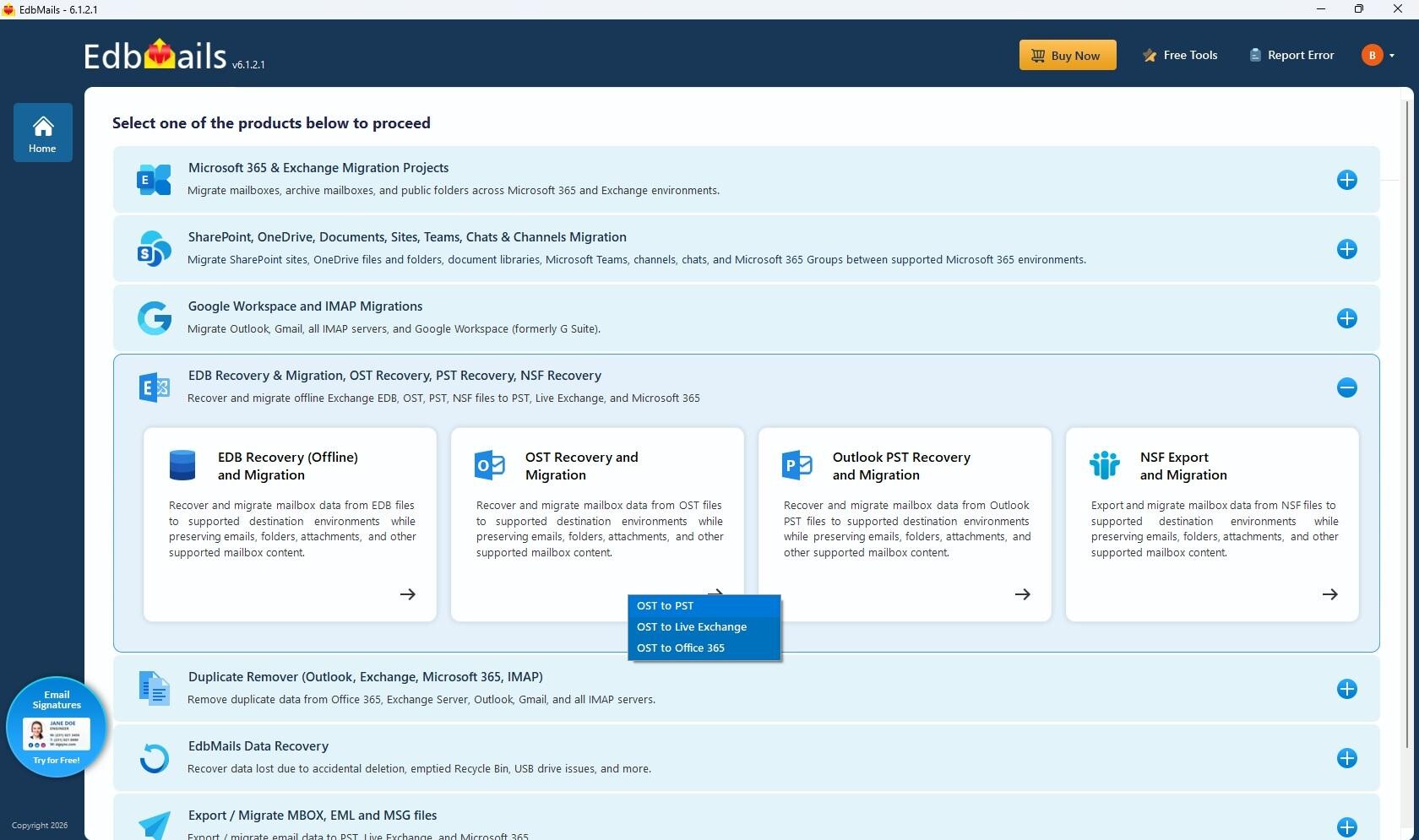
Choose OST to PST. Open OST Recovery and Migration and select OST to PST.
Step 2 · Preview and select mailbox data
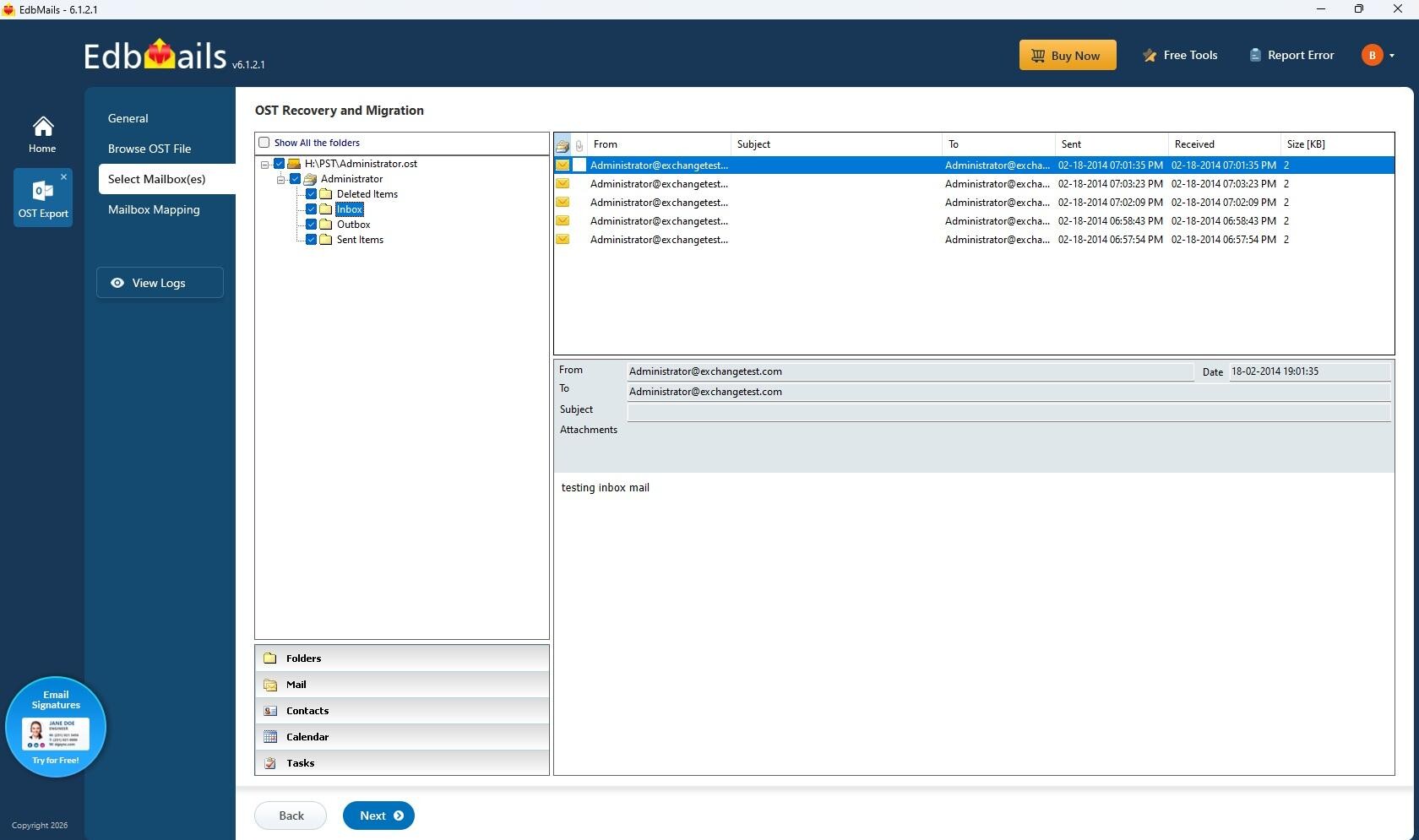
Preview before conversion. Browse the detected mailbox tree, inspect supported items and choose the folders or mailbox content required for the PST output.
Step 3 · Verify mapping and start PST export
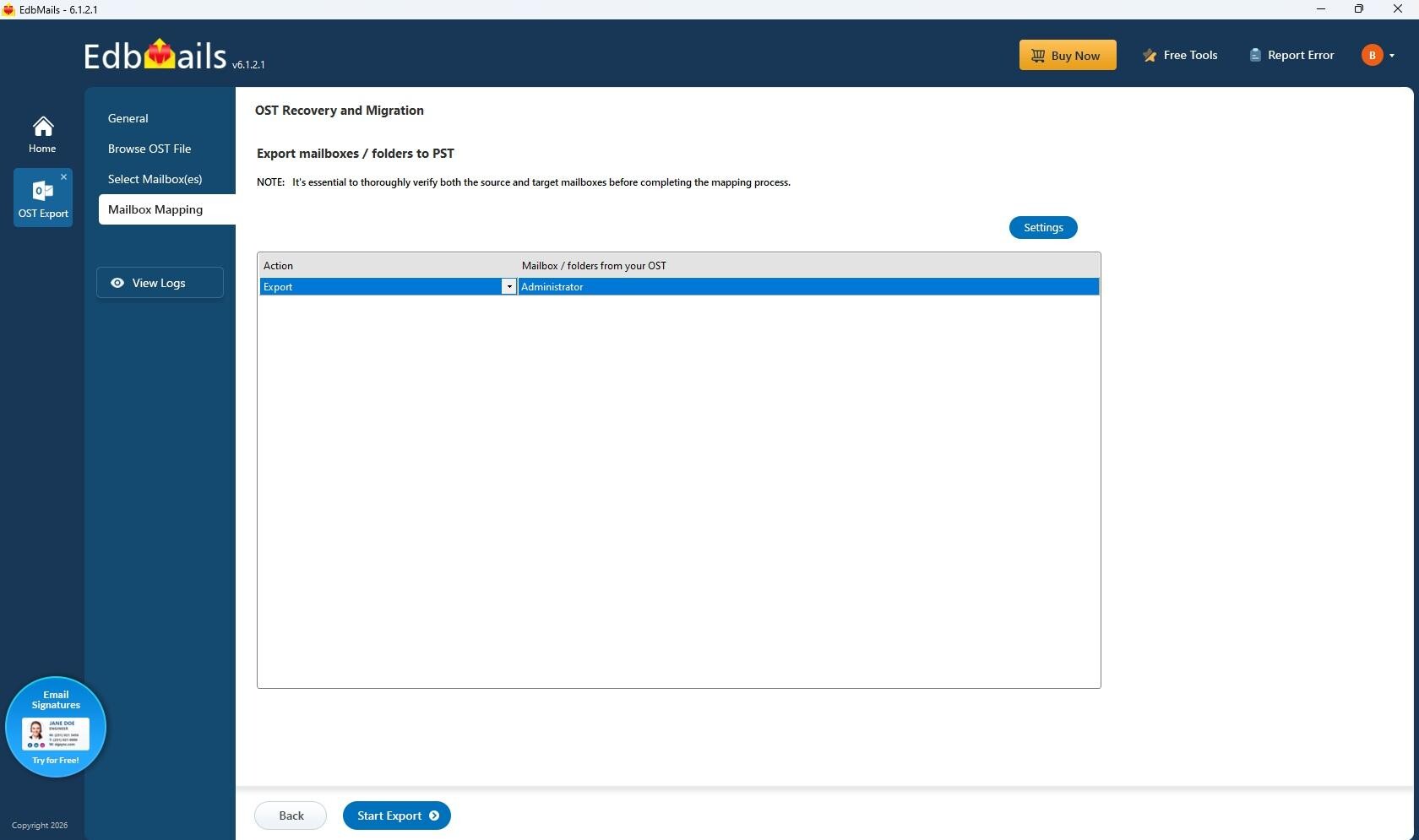
Confirm the PST export. Review the selected mailbox or folders, adjust the applicable conversion settings, and start the PST export when the selection is ready.
How the OST-to-PST workflow works
Select the OST to PST conversion workflow
Open EdbMails, choose OST Recovery and Migration, and continue with the OST to PST option. This workflow can be used for normal OST conversion as well as recovery-oriented cases involving orphaned, disconnected, inaccessible or damaged OST files.
Add the source OST
Browse to an accessible copy of the OST file. For recovery work, keeping the original file unchanged and scanning a working copy is sensible practice.
Scan and inspect
EdbMails scans the file for mailbox content that remains readable. Users can then examine folders and preview supported items before deciding what should be exported.
Select folders or items
The user can choose the entire detected mailbox or narrow the job to specific folders and items. Supported filtering options help reduce unnecessary output.
Export to PST
Select PST as the target, choose the destination and start the export. Outlook with a configured profile is required for PST export; it is not required merely to scan and preview the OST.
Validate the result
Review the export report and open the resulting PST in a supported Outlook profile. Spot-check important folders, dates, attachments and item counts before treating the recovery as complete.
How to Convert OST to PST – Step-by-Step Guide
Recovery scenarios covered by EdbMails
EdbMails is particularly useful when an OST has become detached from the environment that created it. Common examples include a deleted Outlook profile, failed workstation, old Microsoft 365 account, synchronization failure, or OST corruption. In these cases, simply copying an OST to another computer does not make it a portable Outlook archive.
The converter reads the local OST directly and works with the mailbox information that is actually present in the file. It can also identify recoverable deleted items when that information remains recoverable in the OST.
Recovery reality: no OST recovery application can recreate data that was never cached locally, has already been overwritten, or is no longer readable. EdbMails’ useful advantage is that users can scan and preview their own source file before buying the full license.
Free trial: a meaningful way to evaluate recovery
EdbMails currently allows the free trial to scan the OST, preview recoverable mailbox content and export up to 30 items per folder. That is useful because buyers can test a representative PST with their own data instead of relying only on marketing claims. For a recovery product, this type of try-before-you-buy workflow is one of the strongest purchasing safeguards.
Performance and large OST files
Conversion performance depends on more than the software itself. OST size, the number of items, attachment volume, storage speed, source-file condition and the output destination can all affect scanning and export time. EdbMails does not impose an application-level source OST size limit, but that should not be confused with a promise that every large or severely damaged OST will process at the same speed.
For a large mailbox, the better test is practical: scan a copy, preview several folders, export a representative sample and validate the PST. EdbMails also provides controls for splitting PST output into smaller files when required. This changes the output organization; it does not shrink or repair the original OST.
Selective OST to PST conversion, recovery filters and mailbox control
A useful OST to PST Converter should not force every conversion or recovery case into an all-or-nothing export. EdbMails allows users to browse the mailbox hierarchy and choose the folders or items relevant to the case. Supported filters can be applied when only data from a particular period is needed. This can be valuable for legal review, an employee mailbox handover, an old project archive or a targeted recovery where only a subset of the OST needs to become a PST.
The benefit is operational as well as convenient. Smaller, targeted exports are easier to validate. Instead of checking a large PST containing years of unrelated data, an administrator can focus on the folders and date ranges that were actually requested.
Mailbox fidelity and post-export validation
For mailbox recovery, successful conversion is not simply the creation of a .pst file. The output should be checked for usable folder organization, readable messages, attachments, dates and supported mailbox item types. EdbMails is designed to retain supported hierarchy and applicable message properties that are present and readable in the OST, while its reporting gives users an additional reference after export.
We recommend opening the resulting PST in a supported Outlook profile and checking representative folders before archiving or handing over the output. Review several messages with attachments, contacts, calendar entries and any folders that are especially important. This validation step is good practice regardless of which OST converter is used.
Security and responsible recovery expectations
EdbMails works with data that is accessible in the source OST; it should not be described as a way to defeat external access controls. The software does not replace credentials or bypass BitLocker, EFS, ransomware encryption, passwords or other protections that prevent the OST itself from being accessed. This distinction is important because recovery capability and access-control circumvention are not the same thing.
Organizations should also handle OST files as potentially sensitive business records. Work from authorized copies, store exported PST files in an appropriate location, restrict access to the recovery workstation and retain only the output required by organizational policy.
What makes an OST recovery review credible?
Recovery software should be judged on evidence a user can verify. A credible test starts with a copy of the actual OST, checks whether the expected folders appear, previews representative mailbox items, performs a sample export and then opens the PST in Outlook. Important folders should be spot-checked for dates, attachments, contacts, calendar entries and item counts. EdbMails supports this verification-oriented approach through its preview, trial export and post-export reporting.
We also avoid treating “fast” or “accurate” as universal numbers. A 5 GB healthy OST on SSD storage and a heavily damaged 80 GB OST are different workloads. File condition, item count, attachment volume, disk performance and destination all influence processing time. The strongest performance test is therefore the user’s own representative source file.
EdbMails compared with established OST-to-PST products
A useful competitor comparison should go beyond counting checkmarks. Kernel, SysTools and Shoviv all market established OST conversion products with preview, PST export and recovery-oriented features. The practical differences emerge in the evaluation allowance, workflow, licensing, output destinations, filtering controls and how easily a buyer can validate the result before committing to a full conversion.
EdbMails makes a particularly clear case for buyers who want to inspect their own OST first and then perform a targeted PST export. Its current free-trial allowance is up to 30 items per folder, and the product combines preview, granular selection, filtering, multiple output formats and reporting in the same recovery workflow. Competitors may offer different trial limits or additional format choices, so buyers with a specialized destination should compare that requirement directly rather than choosing on brand recognition alone.
Established products from SysTools, Shoviv and Kernel also compete in the OST recovery and conversion market. All of these vendors emphasize capabilities such as OST scanning, mailbox preview and PST conversion, so the buying decision should focus on the details that affect the user’s actual recovery case.
| Evaluation area | EdbMails OST to PST Converter | Other established OST converters |
| Orphaned / inaccessible OST | ✓ Recovery-oriented workflow | Commonly supported by major competing products |
| Preview before full export | ✓ Mailbox and item preview | Available in major competing products |
| Selective conversion | ✓ Folder/item selection and supported filters | Commonly available; implementation varies |
| Free evaluation | Up to 30 items per folder | Limits vary by vendor; for example, some publish 25 or 50 items per folder |
| Published entry positioning | From $45 at time of review | Pricing and editions vary by vendor |
| Additional output paths | PST, EML, HTML and MHT file-based output choices | Several competitors provide additional formats and cloud/server targets |
| Support | Free 24/7 technical support published by EdbMails | Support models vary by vendor and edition |
Comparison reflects publicly described product capabilities available when this review was prepared. Features, trial limits and pricing can change.
Why we consider EdbMails a cost-effective OST to PST Converter
Cost-effectiveness is not simply the lowest purchase price. A recovery tool also needs to let users establish whether it can read their source data before they pay. EdbMails combines a published starting price of $45 with mailbox preview, a 30-items-per-folder trial export, granular selection and free 24/7 technical support. For users primarily seeking OST-to-PST recovery rather than a larger migration suite, that creates a straightforward value proposition.
Mailbox data that can be converted or recovered to PST
Where the information remains present and readable in the source OST, EdbMails supports recovery of mailbox content including emails, attachments, contacts, calendars, tasks, notes and applicable mailbox folders. It is designed to preserve supported message properties, timestamps, folder hierarchy and metadata during export. Users should still validate the resulting PST because the condition of the source file determines what can ultimately be recovered.
Pros and considerations
What we liked | Points to understand before buying |
· Clear OST to PST conversion workflow for healthy, orphaned, disconnected, inaccessible, and damaged OST files. | · Recovery depends on what remains present and readable in the OST file. |
· Preview mailbox data before committing to a full conversion. | · Outlook with a configured profile is required when exporting recovered data to PST. |
· Selective folder and item-level export. | · Server-only information or data never synchronized into the OST cannot be recreated from the local file. |
· Free trial export of up to 30 items per folder. | · Large or severely damaged OST files should be tested with the free trial before purchasing a license. |
· Supports PST, EML, HTML, and MHT output formats. | · Recovery results may vary depending on the condition of the OST file. |
· Detailed export reporting. | — |
· Cost-effective starting price of $45 at the time reviewed. | — |
· Free 24/7 technical support. | — |
What to check before purchasing an OST to PST Converter
Buyers comparing EdbMails with another OST converter should test the products against the same source file and the same recovery goals. A useful evaluation should answer a few practical questions:
- Does the software successfully scan the specific OST you need to recover?
- Can you preview the folders and mailbox items that matter before purchase?
- Are important attachments, dates, contacts, calendars and folder structures visible?
- Can you select only the folders or time period required for the job?
- Does the trial permit a representative export that can be opened and checked?
- Is the edition being purchased appropriate for the required OST to PST conversion workload?
- Is technical support available if the source OST behaves differently from a normal file?
On these points, EdbMails provides a well-rounded evaluation path. The free trial is particularly important because recovery quality is source-dependent: the buyer can see what the application detects rather than making a decision solely from marketing copy.
Who should consider EdbMails?
EdbMails is relevant for users who need to convert an OST to PST as well as for recovery-focused cases. That includes individuals moving accessible OST data into a PST, IT administrators dealing with orphaned or disconnected OST files, consultants handling authorized mailbox recovery, and organizations that want to inspect an OST before deciding what should be exported. The Personal Edition is positioned for straightforward OST-to-PST requirements, making edition selection easier for users whose primary goal is PST output.
Users whose original mailbox is still online and healthy should first consider whether Outlook’s normal synchronization or export options already solve the problem. Dedicated recovery software is most valuable when the OST itself has become the primary accessible source of the mailbox data.
Editor’s Choice 2026: final assessment
EdbMails OST to PST Converter earns our Editor’s Choice recognition for combining a straightforward OST to PST conversion path with recovery-oriented controls. The workflow follows a sensible order: inspect the source OST, preview what is available, choose the required folders or items, export to PST, and validate the result. The product can scan and preview an accessible OST without requiring the original Outlook profile, and it gives users practical control over what ultimately goes into the PST.
Its combination of corrupt and orphaned OST handling, mailbox preview, selective recovery, support for important mailbox item types, multiple output choices, reporting, trial export and value-focused pricing makes it a strong option for both individual recovery cases and professional IT use. Most importantly, users can evaluate the recovery result against their own OST before purchasing.
For those reasons, our editorial team recognizes EdbMails OST to PST Converter as an Award-Winning OST to PST Converter and an Editor’s Choice for 2026. The recognition is based on the product’s overall OST to PST conversion and recovery workflow rather than a single headline feature: users can evaluate the OST first, preview recoverable content, narrow the export, create PST output, review reporting and independently validate the result.
For buyers comparing OST recovery tools, that combination provides a clear decision path. Start with the free trial, test the actual OST, verify the folders and items that matter, and purchase the appropriate edition only after the recovery result has been demonstrated on the source data.