



SPF flattening is the process of converting DNS-querying SPF mechanisms—such as an include term, mx term, a term, and sometimes a redirect term—into direct ip4 and ip6 entries. The result is a flattened SPF record that contains a flat IP address list instead of references that require recursive DNS lookups.
SPF exists to help receiving email servers verify whether a sending server is authorized to send mail for a domain. During SPF validation, the receiving server evaluates the domain’s SPF record.
This is common for businesses using multiple email services, including Google Workspace, Office 365, SendGrid, CRMs, Marketing Automation platforms, Customer Support systems, and Order Fulfillment tools. Each third-party sender often asks the domain owner to add an include term to the SPF record. Over time, chained include terms and a nested SPF record can consume lookup capacity quickly.
For example, a domain may authorize:
- Google for employee mail
- Office 365 for a separate business unit
- SendGrid for transactional email
- A CRM for sales outreach from *sales@example.com*
- A support platform for *support@example.com*
- Marketing Automation for newsletters
Even if the visible SPF record has only a few entries, hidden DNS lookups inside each include term can exceed the DNS lookup limit. SPF flattening reduces those DNS lookups by replacing external references with the actual IP addresses behind them.
Why DNS Lookups Affect Email Deliverability
When a Sender Policy Framework (SPF) check fails because of too many DNS lookups, receiving email servers may treat the message as suspicious. That can damage email deliverability, especially when combined with weak DKIM or DMARC alignment. SPF failures mitigation is therefore not just a DNS hygiene task; it is part of broader email infrastructure and authentication strategy.
A flattened SPF record can improve SPF record compliance by keeping the policy within SPF rules and DNS server rules. However, SPF flattening also introduces a maintenance burden: IP addresses used by third-party email sources change over time. If a flattened SPF record is not refreshed, legitimate senders may become unauthorized.
Key Features to Look for in an SPF Flattener Tool
A good SPF Flattening Tool should do more than create a static IP list. It should understand SPF configuration, track monitored senders, detect duplicate senders, and help you update SPF record values safely.
Automated IP Resolution and Re-Flattening
The most important feature is automatic resolution of an include term, mx term, a term, and redirect term into IP addresses. The tool should also re-flatten the SPF record on a schedule because vendors such as Google, Office 365, and SendGrid may change their sending IP addresses.
Manual SPF flattening can work for small domains, but it is risky for production email infrastructure. A cron job that periodically resolves third-party email sources is better than a one-time copy-paste, but a dedicated automatic SPF tool with SPF monitoring and SPF update automation is more reliable.
Static IP List vs Dynamic SPF
A static IP list is easy to publish, but it creates operational risk. Dynamic SPF, sometimes delivered through a managed macro-based solution or vendor-hosted record, can reduce the need to constantly update SPF record data manually. Dynamic SPF is especially useful when a business uses many business email services and has little SPF headroom left.
Support for SPF Macros
Some email security vendors offer SPF macros or an SPF macro-based approach to avoid the DNS lookup limit while keeping authorization dynamic. SPF macros can be useful, but they must be implemented carefully because not all administrators understand how SPF macro evaluation works.
Validation, Monitoring, and Record Length Controls
An SPF flattener should validate the final SPF record before publication. It should check for:
- DNS lookups remaining after SPF flattening
- Overlapping IP ranges
- Duplicate senders
- Invalid mechanisms
- Record length limitation issues
- TXT record formatting problems
- SPF validation behavior across major receivers
The best tools also include an SPF check, alerts for SPF failures, and a preview of the flattened SPF record. Some tools provide an SPF record builder so teams can add Verified Email Sources or Verified Senders without breaking the domain’s SPF configuration.
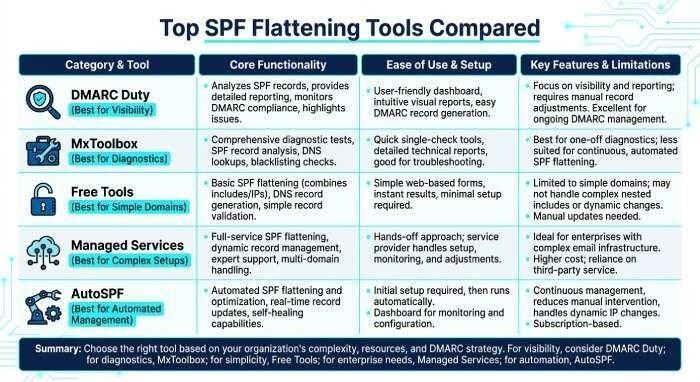
Best SPF Flattening Tools Compared
There are several approaches to SPF flattening, from a free SPF flattening tool to enterprise-grade managed services. The right choice depends on how often your IP addresses change, how complex your SPF record is, and how much automation you need.
1. DMARC Duty
DMARC Duty is useful for organizations that want SPF flattening alongside DMARC and DKIM visibility. It can help identify authorized third-party sender platforms, reduce DNS lookups, and maintain a flattened SPF record over time.
Best for:
- Organizations with multiple email services
- Teams that need SPF monitoring
- Domains requiring SPF record compliance
- Businesses managing Customer Support, CRMs, and Marketing Automation senders
DMARC Duty is a strong option when email deliverability is tied to a broader DMARC enforcement project. It helps the domain owner understand which platforms are actually sending mail and which duplicate senders can be removed.
2. MxToolbox
MxToolbox is widely used for DNS, blacklist, and SPF diagnostics. While it is often more of an SPF Tool and checker than a fully managed flattener, it is valuable for identifying DNS lookups, SPF failures, chained include terms, and Too Many Lookups Error conditions.
Best for:
- Running an SPF check before and after changes
- Diagnosing an existing SPF record
- Confirming whether a flattened SPF record is valid
- Finding SPF Mechanism issues
MxToolbox is especially helpful when comparing the original SPF record with the flattened SPF record to verify that the right IP addresses remain authorized.
3. Free SPF Flattening Tool Options
A free SPF flattening tool can be helpful for small domains or initial cleanup work. Many free SPF flattening tool options resolve the include term, mx term, and a term into a flat IP address list that can be pasted into DNS.
Best for:
- Small domains with simple email infrastructure
- One-time SPF troubleshooting
- Testing whether SPF flattening will reduce DNS lookups
- Learning how each include term expands
However, a free SPF flattening tool usually lacks continuous SPF update automation. If Google, Office 365, SendGrid, or *business-email.service* changes its IP addresses, your flattened SPF record may become stale unless you re-flatten it regularly.
4. Managed Dynamic SPF Services
Managed Dynamic SPF services are designed for businesses that cannot afford downtime or email deliverability problems. They often provide automatic SPF tool functionality, SPF monitoring, alerts, and dynamic updates.
Best for:
- Complex SPF configuration
- High-volume senders
- Multiple brands or domains
- Teams with limited DNS administration resources
These services may also support a macro-based solution, reducing maintenance burden while keeping the SPF record compliant with DNS server rules and SPF rules.
5. AutoSPF
AutoSPF is a useful solution for businesses that want to simplify SPF flattening and automate ongoing SPF record management. It helps organizations manage complex SPF records, reduce DNS lookup issues, and maintain accurate sender authorization as their email infrastructure changes.
Best for:
- Businesses using multiple third-party email services
- Organizations managing complex SPF records
- Companies looking for automated SPF flattening
- IT teams that want to reduce manual DNS maintenance
- Businesses focused on preventing SPF PermError and deliverability issues
AutoSPF helps businesses avoid the limitations of manual SPF flattening by supporting ongoing record management and updates. As organizations add or remove email platforms such as Google Workspace, Microsoft 365, and marketing automation tools, maintaining an accurate SPF record becomes increasingly important. Its automation-focused approach makes it a valuable option for businesses that want reliable email authentication without constantly updating DNS records manually.
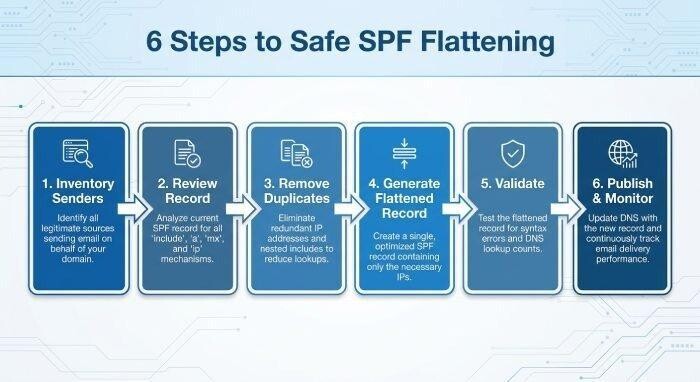
How to Implement SPF Flattening Safely
Step-by-Step Implementation Process
- Inventory all senders: List every third-party sender, including Google, Office 365, SendGrid, CRMs, Customer Support platforms, Order Fulfillment systems, and Marketing Automation tools. Confirm which systems send as *sales@example.com*, *support@example.com*, or other domain identities.
- Review the current SPF record: Identify each include term, mx term, a term, and redirect term. Check whether any nested SPF record or chained include terms are consuming unnecessary DNS lookups.
- Remove duplicate senders: Some platforms are already covered by another include. Removing duplicate senders can preserve SPF headroom before flattening is needed.
- Generate the flattened SPF record: Use a reputable SPF Flattening Tool, SPF record builder, or free SPF flattening tool to resolve mechanisms into IP addresses. The resulting flattened SPF record should stay within the record length limitation and avoid excessive TXT fragmentation.
- Validate before publishing: Run an SPF check using MxToolbox or another SPF Tool. Confirm that the flattened SPF record has reduced DNS lookups and still authorizes all legitimate IP addresses.
- Publish and monitor: Update SPF record values in DNS, then monitor DMARC aggregate reports, DKIM alignment, and SPF failures. Continue SPF monitoring after publication.
DNS Publishing Tips
When publishing a flattened SPF record, remember that DNS TXT records can contain multiple quoted strings, but receiving email servers evaluate them as one logical SPF record. Do not create multiple SPF records for the same hostname. Splitting SPF records across multiple TXT records is invalid and can cause SPF validation errors.